AI Video Translator Logo

Free AI Video Translator

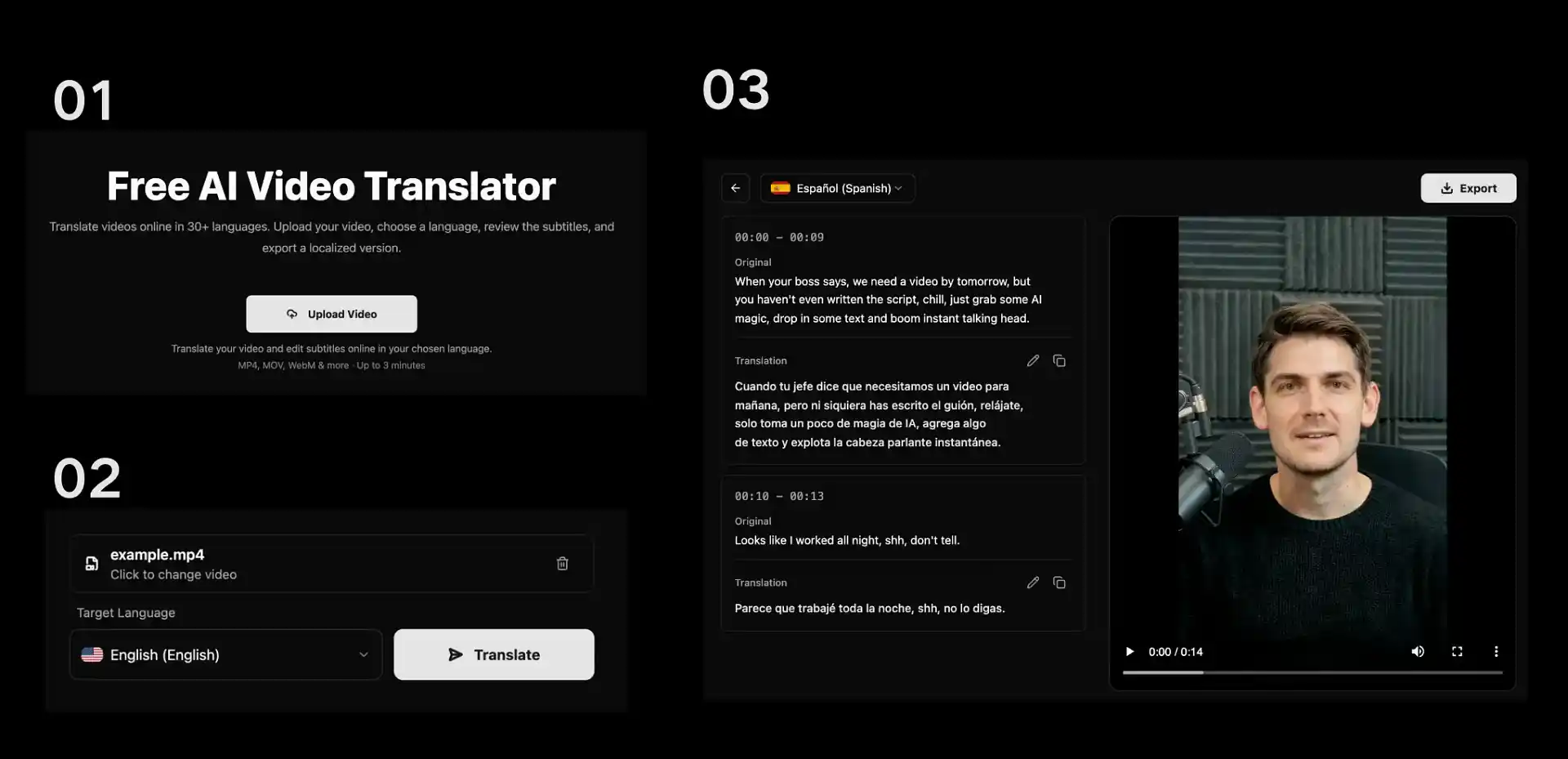
Translate videos online in 30+ languages. Upload your video, choose a language, review the subtitles, and export a localized version.

Upload video → Select language → Review subtitles → Export video

MP4, MOV, WebM & more · Up to 3 minutes

01
30+
Supported Languages
02
AI
AI-Powered Translation
03
3min
Max Video Length

Why Choose AI Video Translator?

01

Simple Online Workflow

Upload a video, select the language you need, and manage the translation in one browser-based workflow. The process keeps upload, language selection, subtitle review, and export together, so you do not need to move between separate tools for each step.

02

Free to Start

Start translating without an upfront payment and explore the workflow before committing to an export. Any available limits or paid options are shown in the product, helping you choose an option that fits the video you are preparing.

03

Subtitle Review

Generate subtitles automatically, then review and edit the text before export so the final video matches your message. This gives you a chance to correct names, terminology, tone, and other details that benefit from human review.

04

Multilingual Reach

Use one source video to prepare versions for viewers who speak different languages, without rebuilding the entire project from scratch. It is a practical way to reuse approved footage while adapting the spoken content and subtitles for new audiences.

How to Translate a Video Online

How to Translate a Video Online
01

Upload a Video

Select a video from your device. The homepage accepts MP4, MOV, WebM, OGG, FLV, MPEG, and MPG files up to 3 minutes long.

02

Translate Your Video

Choose the language you want to translate into, then click Translate Video. Your file is uploaded and prepared for subtitle translation.

03

Review and Export

Open the subtitle editor to review the translated text, make any needed edits, and export the finished video. Processing time varies with the video and selected language.

Powerful AI Video Translator Features

01

Global Language Support

Choose from 30+ supported languages to create localized video versions for international audiences. Select the language that fits your viewers, then use the subtitle review stage to make sure terminology and phrasing work for the intended market.

02

Auto Subtitles

Create subtitles as part of the translation process instead of starting from a separate transcript. Review the generated text, make edits where context matters, and use the final subtitle copy as part of your video localization workflow.

03

Video to Text

Turn spoken video into editable text, helping you check the transcript, refine subtitles, and prepare translated content. An editable text layer makes it easier to spot unclear wording and keep key names, product terms, or calls to action consistent.

04

Audio to Text

Convert audio into an editable transcript when you need a text starting point for subtitles or translation. You can review the transcript before using it in a video workflow, which is useful for interviews, lessons, product explainers, and other voice-led content.

Use Cases

Create localized versions of the videos you already produce

Grow Your Social Media
01

Grow Your Social Media

Prepare localized versions of short-form or long-form videos for TikTok, Instagram, YouTube, and other channels. Start with the content you have already recorded, choose a target language, and review the subtitles before you publish to help the message stay clear for each audience.

Scale Ads Worldwide
02

Scale Ads Worldwide

Adapt product videos and campaign creatives for more markets by translating the source video and checking the subtitles for local context. Review product names, calls to action, pricing references, and campaign language before export so the localized version remains aligned with the original brief.

Create Multilingual Courses
03

Create Multilingual Courses

Make lessons and training clips easier to follow for multilingual learners. Use the editable transcript to review subject-specific terminology, speaker names, and key instructions before you export, then reuse the same source material for additional language versions as needed.

User Reviews

Join Thousands of Satisfied Creators & Enterprises Using Our AI for Video Localization

01Jack Smith

Jack Smith

Content Creator

This AI video translation tool has completely transformed my workflow. What used to take days for multilingual videos now only takes minutes. The quality is amazing!

200+Videos Created
80 hoursTime Saved
02Maya Jones

Maya Jones

Marketing Manager

Our company used this AI translation service to create 15 language versions for our product videos, significantly improving conversion rates in international markets. ROI exceeded 300%!

150+Videos Created
120 hoursTime Saved
03Lily Alice

Lily Alice

Educator

As an online education platform, we need to translate courses into multiple languages. This AI translation tool not only saved costs but also ensured consistent teaching quality.

300+Videos Created
200 hoursTime Saved
04Joneson Frank

Joneson Frank

Corporate Trainer

There's a huge demand for multilingual corporate training videos. This AI video translation technology helped us quickly expand to global markets. Employee feedback is very positive.

100+Videos Created
60 hoursTime Saved
05Chris Wu

Chris Wu

Video Producer

From a technical perspective, the lip-sync accuracy of this AI translation system is impressive. Our clients are very satisfied with the final results.

250+Videos Created
150 hoursTime Saved
06Sofia Hernandez

Sofia Hernandez

Travel Blogger

Thanks to the AI Video Translator, I can now share my travel stories with audiences all over the world. It’s incredible to see viewers from different countries engaging with my videos in their own languages.

180+Videos Created
90 hoursTime Saved

Frequently Asked Questions about AI Video Translator

AI Video Translator helps turn a source video into a localized version. Upload a video, select a target language, generate subtitles, review the text, and export the result.

You can start using the tool for free. Any applicable limits or paid options are shown in the product before export.

The tool supports 30+ languages and common video formats. Upload limits are shown in the upload area and may change as the product evolves.

Currently, our AI Video Translator does not support direct video import from platforms like YouTube. You need to upload the video file directly from your device.

Yes. AI-generated translations can need adjustments for names, technical terms, tone, and context. Review and edit the subtitles before export.

Processing time varies with video length, language pair, and current demand. You can continue once the translation is ready to review.

Yes. Review and edit the generated subtitle text before exporting your localized video.

Read our Privacy Policy for the current details on how uploaded files and personal information are handled.

We provide technical support for our AI Video Translator users via email at [email protected]

The current upload limit is 3 minutes per video.

Ready to Translate Your Video?

Upload a video, choose a language, and review the subtitles before export.